
Have you wondered if the prime obstacle to designing the optimal the AI system isn’t the hardware, but rather managing the heat generated by them? According to the International Institute of Refrigeration, 30% to 55% of the electrical energy consumed in data centres is already used for cooling. And with the introduction of AI the International Energy Agency states that data centres’ worldwide electricity consumption will reach around 945 TWh by 2030
The U.S. Energy Information Administration suggests that in the U.S. the share of servers in commercial electricity consumption was around 7% in 2025, while by 2050 this share is likely to be increased up to 22% or 33%, highlighting that for technologists in the data centre sphere cooling systems is no longer just an operational triviality: it is a critical point of concern.
So the question arises: how to deal with cooling efficiently and sustainably? This article will outline the operation of current cooling systems for data centres, their contrast and selection process.
Let’s talk about the fundamentals first.
What Are Data Center Cooling Systems?
The systems used for cooling a data center consist of devices, controls and methods that allow it to remove heat from IT hardware and keep it functioning in a viable operating parameter. According to ASHRAE, which is a governing body issuing standards in this field, the recommended temperature for the data centers is between 18C and 27C.
It is important to understand what this target means in practice. The effectiveness can be calculated by a standard metric known as Power Usage Effectiveness (PUE), which shows the ratio between the total amount of used energy in the facility and power coming from IT equipment. If we take the example of a PUE of 1.0, it means no wastefulness. According to the survey of the Institute of Uptime conducted in 2025, the average international indicator of PUE has remained at the level of 1.54 for the last six years, while those operating at a large scale report figures around 1.10-1.15. The difference between these two figures presents your opportunity to increase your own cooling efficiency..
With the basics covered, let’s look at the options:
Types of Data Center Cooling Systems
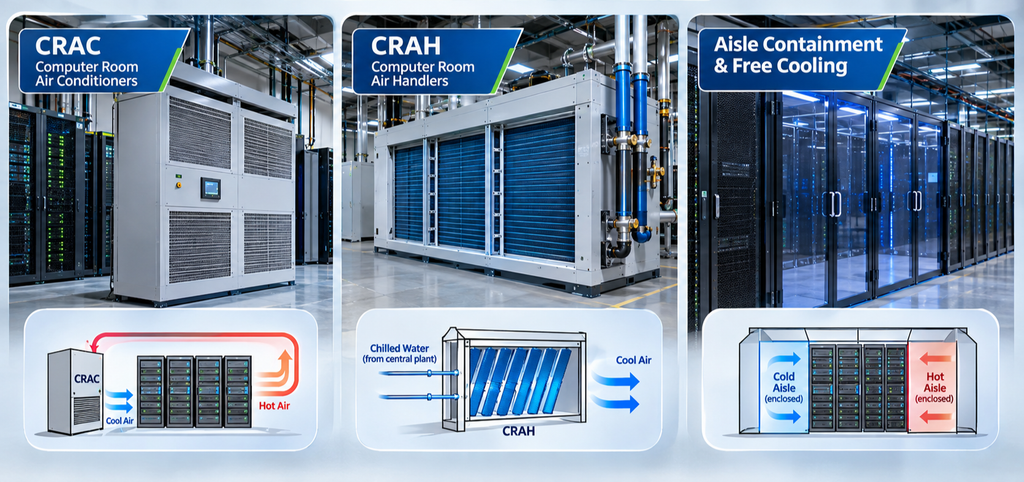
Common Approaches Facilities Already Employ
Traditional Cooling Methods
- Computer Room Air Conditioners (CRAC): These refrigerant-based units chill air that fans push through raised floors or ducts. They are familiar and easy to service, but are always power-hungry.
- Computer Room Air Handlers (CRAH): A close relative of the CRAC, CRAH units pass air over coils filled with chilled water from a central plant. They scale well for large halls and usually cost less to run than CRACs.
- Aisle Containment and Free Cooling: Neither unit works well if hot and cold air keep mixing, which is where containment comes in. Barriers keep cold supply air and hot exhaust apart, and economizers use cool outdoor air or water when climate allows. Both are low-cost improvements, though results depend on geography.
Advanced Cooling Methods
Traditional methods can only stretch so far, especially as rack densities climb. That is why newer approaches bring the cooling closer to the heat itself.
- Rear Door Heat Exchangers: A water-cooled panel on the back of the rack captures heat before it enters the room, raising the density an air-cooled hall can support.
- Direct-to-Chip Cooling: Take that idea a step further and the liquid goes right to the processor. Cold plates on processors carry heat away through liquid loops. Memory and power components still need airflow, so the design stays hybrid.
- Single-Phase Immersion Cooling: Go further still and the entire server goes into the liquid. Servers sit in a tank of dielectric (electrically non-conductive) fluid that absorbs heat from every component. The fluid stays liquid, which keeps the system simple.
- Two-Phase Immersion Cooling: There is also a more aggressive variant. Here the fluid boils at the chip surface and condenses again. Heat removal is excellent, but sealing, fluid handling and service are more complex.
But, whichever technology one chooses, the underlying process is surprisingly consistent. So let’s discuss:
How Data Center Cooling Works
Most designs follow the same four stages:
- Heat capture: Air or liquid absorbs heat from processors, memory and power supplies.
- Heat transport: Fans, pumps and piping carry the warmed medium away.
- Heat rejection: Chillers, cooling towers or dry coolers release the heat outdoors.
- Control: Sensors and software adjust fan speeds, flow rates and setpoints continuously.
The closer a design captures heat to its source, the less energy it spends moving air around a room. So let’s keep that principle in mind, because it explains most of what follows.
So why does all this matter, beyond keeping the room comfortable?
What Are the Benefits of Data Center Cooling
A well-designed cooling system pays you back in several ways.
- Reliability: Stable temperatures reduce thermal stress and unplanned failures.
- Lower energy cost: Cooling is often the biggest overhead beyond the servers.
- Higher density: Better heat removal fits more compute into each rack.
- Sustainability reporting: Lower PUE supports the carbon and water targets investors ask about.
- Sustained performance: Hot chips throttle themselves, so cooling protects the output you paid for.
This is further explained through a comparative study below:
Data Center Cooling Solutions Compared on Efficiency, Density, Cost, and Maintenance
Seeing the options side by side makes the trade-offs much easier to judge
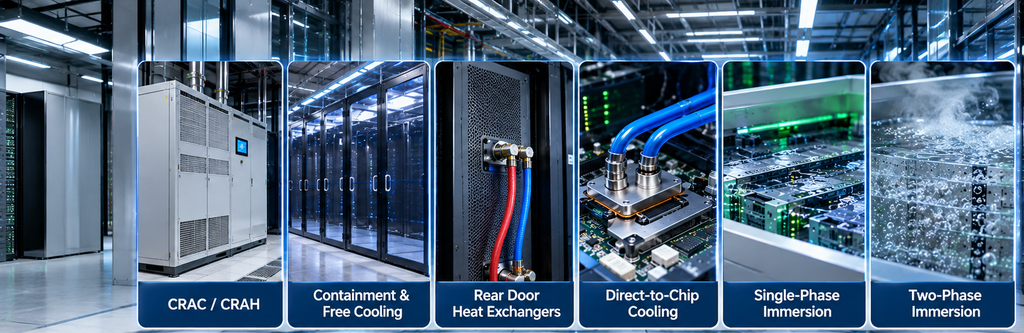
| Solution | Efficiency | Density | Upfront Cost | Maintenance |
| CRAC / CRAH | Moderate | Low | Low | Frequent filter and fan service |
| Containment and free cooling | Good, climate dependent | Low to medium | Low to medium | Moderate |
| Rear door heat exchangers | Good | Medium to high | Medium | Moderate |
| Direct-to-chip | Very good | High | Medium to high | Moderate, airflow still needed |
| Single-phase immersion | Excellent | Very high | Medium | Low, few moving parts |
| Two-phase immersion | Excellent | Very high | High | Higher, specialized fluid handling |
That said, treat this as a starting point. Your climate, workload and utility rates will shift the results.
So how do you turn a comparison table into an actual decision?
How To Choose the Best Data Center Cooling Systems for Your Facility
Work through these steps in order.
- Measure first: As Lord Kelvin said, “If you cannot measure it, you cannot improve it.” Collect rack-level power and PUE data.
- Plan for the hardware one will buy: Look ahead, not just at today’s racks. AI accelerators raise density faster than building cycles.
- Check climate and water access: They limit what free cooling can deliver.
- Compare ten-year total cost: Include energy, water, floor space and maintenance, along with purchase price.
- Review retrofit effort: Some options fit existing halls, others need new construction.
- Pilot one row or tank: It proves the numbers in one’s own environment.
Coming to realize the old physics reasoning- ‘Air carries heat poorly’
Data Center Liquid Cooling Systems: Why the Industry Is Moving Beyond Air
If you follow those steps with AI hardware in mind, most roads lead to the same place: liquid. Liquids hold thousands of times more heat per unit of volume, so a small flow of liquid does the work of an enormous volume of air. That matters especially now, because the hardware has changed.
The industry data backs this up. Uptime Institute found that operators planning AI workloads in existing facilities named power density and cooling capacity as their top constraints, ahead of power availability and space. Lawrence Berkeley National Laboratory adds that U.S. data center electricity use nearly tripled between 2016 and 2023. Liquid-based data center cooling solutions let you meet that demand without a matching rise in cooling energy.
Finally understanding why it makes more business sense to have:
Immersion Cooling: The Future of AI Data Center Cooling
Immersion cooling is one of the most compelling forms of liquid cooling available, as it eliminates the disadvantages of all other methods. In immersion, there are no hot spots since each component is in contact with the cooling liquid, and server fans can often be removed thereby reducing overall energy consumption.
The tank designs used in single-phase immersion cooling systems are comparatively simple, because unlike two-phase immersion cooling systems, single-phase immersion cooling fluids do not boil or need to recondense. Plus there are not many moving components. For an artificial intelligence cluster, where the power of racks exceeds the air cooling capabilities, immersion cooling is an excellent cooling opportunity, with far fewer hassles than complex direct-to-chip architectures.
Therefore deploying Intelligence at the Edge
The GRC Immersion Cooling Advantage
Which brings us to a company that has built its business around this approach. GRC (Green Revolution Cooling) has focused on single-phase immersion for more than a decade. The company states that its ICEraQ Series 10 can deliver a PUE below 1.03 and cool up to 368 kilowatts per unit. GRC also reports that removing server fans can cut server power by 10% to 20%, and that single-phase immersion can reduce total data center energy use by 35% to 50% against air cooling. These are vendor figures, so validate them against your own workload.
Numbers on a spec sheet are one thing, but a working installation is better proof. The Texas Advanced Computing Center offers a real example. Its Lonestar6 supercomputer uses ICEraQ and runs at a PUE near 1.1, with a carbon footprint reduced by up to 40%. If you are evaluating cooling systems for data centers, GRC’s team can model your site and show what that could mean for you.
Conclusion
Ultimately, the challenge facing efficient cooling of AI data centers is no longer technical feasibility, but industry readiness to rethink conventional data center architectures.
Cooling is now a major factor in both energy costs and sustainability efforts. Air cooling is still adequate for smaller workloads, but as AI computing capacity grows, liquid cooling is becoming not just a practical choice but an absolute necessity. The time is now to assess your rack density, measure your power usage effectiveness (PUE), and see how immersion and hybrid cooling methods compare in their ability to meet your cooling needs and compute demands.
So are you looking for cooling solutions for your data center?
Contact GRC to talk through your site requirements, and share your own edge cooling challenges in the comments.
FAQs
1. What Is the Most Efficient Cooling System for Data Centers?
Immersion cooling currently reaches the lowest PUE values, with GRC reporting pPUE figures below 1.03 for its single-phase systems.
2. What Temperature Should a Data Center Be Kept At?
ASHRAE recommends an inlet air temperature of 18°C to 27°C (64.4°F to 80.6°F) for most equipment classes.
3. Is Liquid Cooling Better Than Air Cooling for Data Centers?
For high-density and AI workloads, yes. Liquid removes heat more directly and uses less energy. Air remains adequate for lighter loads.
4. What Cooling Systems Do AI Data Centers Use?
Most combine direct-to-chip cooling, rear door heat exchangers, or immersion, with some air cooling for supporting equipment.
5. How Much Does a Data Center Cooling System Cost?
Cost varies with capacity, climate and design. Compare ten-year total cost, because lower energy use often offsets a higher purchase price.
6. Is Immersion Cooling Safe for Servers and Technicians?
Yes, when properly engineered. Dielectric fluids do not conduct electricity, and sealed designs limit exposure. Follow the manufacturer’s handling guidance.
7. Can an Existing Data Center Be Retrofitted with Liquid Cooling?
Often, yes. Rack-based immersion and rear door units can be added to existing halls, though piping and floor loading need review.
8. Which Companies Provide Data Center Cooling Systems?
Established providers include GRC, Vertiv, Schneider Electric, Carrier and Munters. GRC specializes in single-phase immersion cooling.
What happens to a $200,000 compute cabinet when its cooling fan fails at 3 a.m., three hours from the nearest technician?
Nothing dramatic, at first. The fan just stops. Inlet temperatures creep up quietly, with no alarm loud enough to matter because no one is there to hear it. By the time anyone notices, either from a dashboard alert or a dropped connection a customer complains about, the hardware has been running hot for hours, maybe days. This is the quiet risk sitting inside thousands of edge sites right now, and it is one almost nobody discusses in these terms. Edge data center cooling has a people problem, and the people are missing. That absence changes what “reliable” has to mean, what fails first, and which cooling technology can actually survive being left alone.
This article works through all of it: what makes zero-staff sites different, why air cooling struggles there, and what an unmanned infrastructure strategy built around Immersion Cooling looks like when you put it into practice.
First let’s discuss what makes zero-staff sites different:
How Zero-Staff Edge Sites Are Changing the Definition of “Reliable” Cooling
In a staffed facility, reliability usually comes down to how fast someone responds. A fan fails, a technician replaces it, service resumes within the hour. Uptime Institute’s 7th Annual Outage Analysis, released in May 2025, found that power-related issues remain the primary concern for data center operators, and costs continue to rise when failures do occur. The same report found that outages from IT and networking issues increased in 2024, totaling 23% of impactful outages, and that a higher proportion of publicly reported outages tracked by Uptime Intelligence had severe impacts compared with previous years.
Among surveyed operators, 54% say their most recent significant outage cost more than $100,000, with 20% reporting costs exceeding $1 million. Those numbers come from facilities with staff on-site. At a zero-staff edge location, where detection itself is delayed, the same failure can run longer before anyone even knows it is happening.
Reliable cooling at the edge has to mean something closer to “runs correctly without intervention for months,” not “fails safely and waits for someone to show up.”
What Makes a Zero-Staff Edge Site Different From a Traditional Data Center?
A handful of differences separate edge deployments from core facilities like:
- Physical Access
Sites may sit in a cell tower shelter, a retail back room, a roadside cabinet, or a shipping container, often with no raised floor and limited clearance. - Environmental Exposure
Many edge enclosures sit outdoors or in semi-conditioned spaces, exposed to dust, humidity, and temperature swings that a core facility’s building envelope would otherwise filter out. - Staffing Economics
Dispatching a technician to one of hundreds or thousands of distributed sites does not scale the way it does for a handful of large facilities. - Density Pressure
Edge computing is growing fast. One widely cited estimate projects the global edge computing market will reach USD 21.4 billion in 2025 and grow to USD 263.8 billion by 2035. A growing share of that footprint carries AI inference, video analytics, and 5G workloads into enclosures that were originally sized for routers and switches, not GPUs.
Why Conventional Cooling Struggles at Unmanned, High-Density Edge Sites
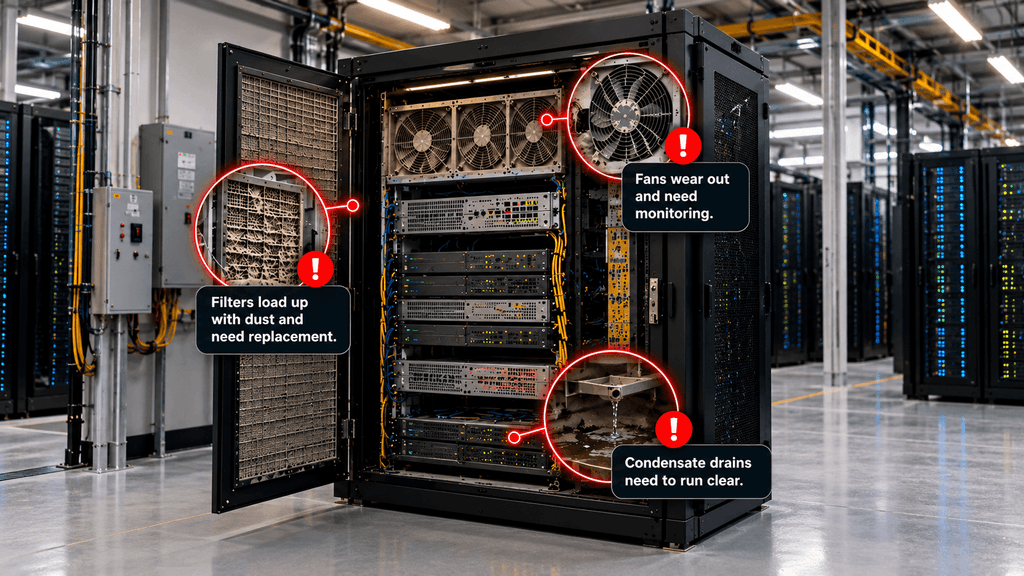
Air cooling depends on a chain of moving parts that all need attention. Filters load up with dust and need replacement. Fans wear out and need monitoring. Condensate drains need to run clear. In a staffed facility, these are routine work orders. At a zero-staff site, a clogged filter can run undetected for weeks, slowly raising inlet temperatures until equipment throttles or shuts down.
ASHRAE Technical Committee 9.9, which publishes the industry’s reference thermal guidelines for IT equipment, builds its recommended temperature and humidity ranges around a reasonably controlled environment. Edge enclosures frequently fall outside that envelope, especially in extreme climates or dusty industrial settings, which pushes air-cooled gear closer to its thermal limits even before density increases.
Add AI inference hardware drawing several hundred watts per accelerator into a cabinet designed for networking gear, and the airflow a small fan-cooled enclosure can move is no longer enough. The failure point arrives faster, with fewer warning signs, and no one on-site to catch it early.
The Cooling Requirements for Truly Autonomous Edge Infrastructure
An edge cooling system built for zero-staff operation needs to meet a different bar than a cooling system in a staffed data hall. It should be able to:
- Run for extended periods without filter changes, fan replacement, or manual adjustment.
- Tolerate dust, humidity, and temperature swings outside a tightly controlled room.
- Operate in a compact footprint, often a single cabinet or a small enclosure.
- Report its own status remotely, since no one will notice a warning light in person.
- Fail in a way that degrades gracefully rather than taking the whole site down at once.
Now let’s address the most important question:
Why Is Immersion Cooling Well Suited to Zero-Staff Edge Operations?
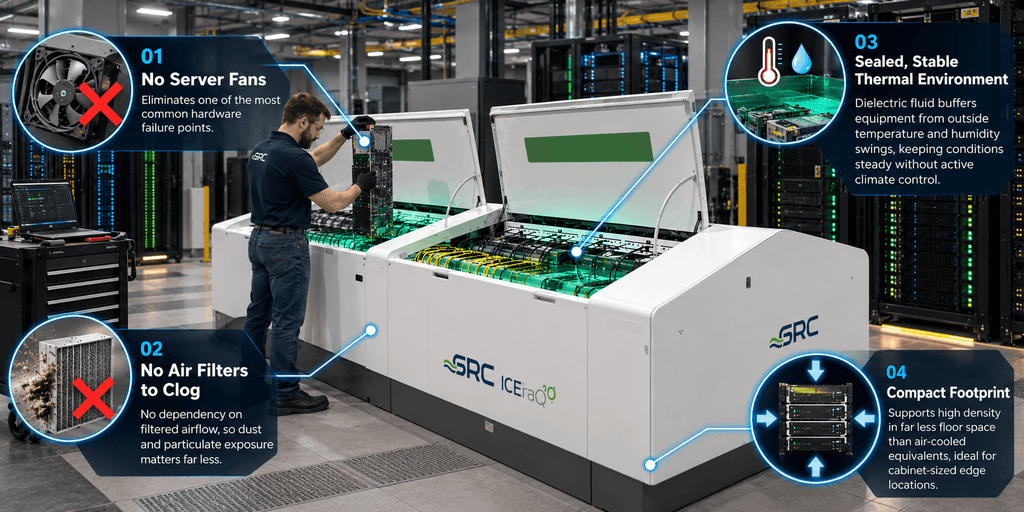
Immersion cooling submerges servers directly in a dielectric fluid, a liquid engineered not to conduct electricity, which absorbs heat from every component without relying on fans or filtered airflow. That single design choice removes most of the failure points that make air cooling hard to sustain unattended. A couple of points listed below explain it in detail:
- No Server Fans
Fans are among the most common moving-part failures in IT hardware. Immersion removes them from the server entirely. - No Air Filters to Clog
Because the system does not depend on filtered airflow across components, dust and particulate exposure in the surrounding environment matter far less. - Sealed, Stable Thermal Environment
The dielectric fluid buffers equipment from swings in outside temperature and humidity, which keeps conditions steady without active climate control in the enclosure. - Compact Footprint
A sealed tank can support high density in far less floor space than air-cooled equivalents, a real advantage in a cabinet-sized edge location, which makes immersion cooling critical for edge data centers.
However one should note that:
“Zero-Staff” Does Not Mean “Zero-Management”
Unmanned does not mean unmonitored. The sites that run well without on-site staff are the ones with strong remote visibility, not the ones with no oversight at all. That means:
- Remote temperature, fluid level, and fluid quality sensors feeding a central monitoring platform.
- Predictive alerts, so a trend toward a problem triggers a scheduled visit instead of an emergency one.
- Clear escalation paths, so the right person is notified before a minor issue becomes an outage.
The goal is to replace constant physical presence with reliable remote awareness, not to remove oversight altogether.
So let’s find out:
How Reliable Is Immersion Cooling and What Maintenance Does It Require?
Immersion systems still need periodic attention, just far less of it and on a longer cycle. Typical maintenance includes:
- Scheduled fluid quality checks, usually on a quarterly or annual basis depending on the system.
- Visual inspection of seals and connections during planned site visits.
- Pump and heat exchanger checks, the few mechanical components the system has.
Because there are no server fans and no filters, the maintenance calendar for an immersion-cooled edge site can look closer to once or twice a year than once a month, which matches the economics of a distributed, unmanned footprint far better than conventional cooling does.
Things to Consider Before Deploying Immersion Cooling at a Zero-Staff Edge Site
A look at a few key points:
- Enclosure Design
Confirm the tank and enclosure fit the physical constraints of the site, including weight, access, and clearance. - Remote Monitoring Integration
Check that sensor data can feed your existing monitoring tools before deployment, not after. - Fluid Logistics
Plan for fluid delivery and servicing routes across your distributed site network. - Hardware Compatibility
Confirm which server and accelerator models are qualified for immersion with your vendor. - Local Regulations
Review any site-specific requirements around dielectric fluids, especially for outdoor or shared-tenancy locations.
Does Immersion Cooling Make Financial Sense at Edge Sites?
The upfront cost of an immersion cooling system is typically higher than a basic air-cooled enclosure. The total cost picture looks different once you include:
- Fewer truck rolls for filter changes, fan replacements, and reactive repairs.
- Lower energy use, since no server fans and little or no local air conditioning are needed.
- Longer hardware life, since dielectric fluid cooling keeps components at more stable temperatures than cyclical air cooling in a dusty enclosure.
- Higher density per site, which can reduce the number of physical locations needed to serve the same coverage area.
Given that one in five operators now reports outage costs exceeding $1 million, the cost of a single avoided incident at a remote, hard-to-reach site can offset a meaningful share of the premium an immersion system carries. Across a network of hundreds of sites, the economics generally favor fewer, lower-maintenance visits over a larger number of smaller recurring truck rolls.
The two important points that tilt the scales for Immersion Cooling:
Efficiency and Autonomy.
And What Does the Future of Edge Cooling Look Like?
Analyst estimates have varied, but the direction has not: Gartner’s often-cited projection held that around 10% of enterprise-generated data was created and processed outside a traditional centralized data center or cloud, with that figure expected to reach 75% by 2025. Whatever the precise number lands at, the pull toward distributed, localized processing is not slowing down, and each new site added to that map is one more location that likely runs without a dedicated on-site team.
Finally deploying Intelligence where the work happens:
How GRC’s Immersion Cooling Architecture Enables Zero-Staff Edge
GRC (Green Revolution Cooling) designs single-phase immersion systems built for exactly this kind of deployment. With GRC, your edge infrastructure gets:
- A compact, sealed tank architecture suited to cabinet-scale and small-enclosure edge sites.
- No server fans and no air filters to maintain on a recurring basis.
- Remote monitoring support that integrates with your existing DCIM, BMS, or NOC tools.
- A maintenance cycle measured in months rather than weeks, built for sites where a service visit is a planned event, not a quick walk down the hall.
- More than a decade of immersion deployment experience informing the design.
GRC’s Immersion Cooling Solutions drive business efficiencies at the edge. With each Edge scenario covered with a specific solution: ICEraQ SX for modular Enterprise White Space, ICEraQ MICRO with Integrated CDU for Modular AI White Container, ICEraQ Nano for Closet Edge and the ICEraQ X for TELCO Edge.
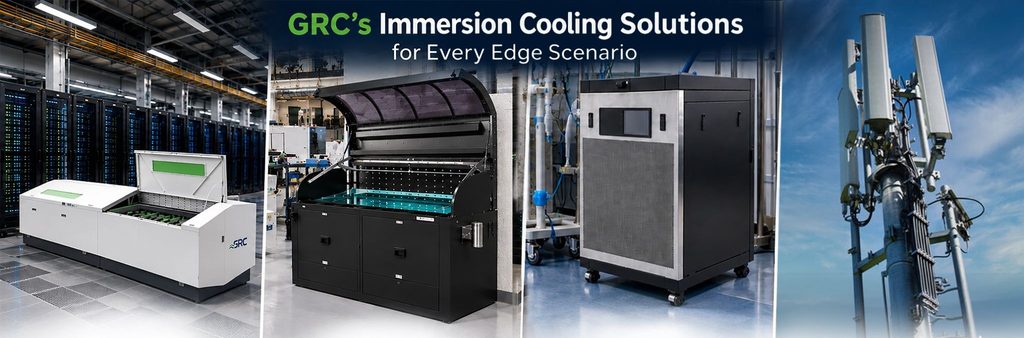
Figure out which solutions are best suited for business. Your specific site constraints and remote monitoring requirements before you commit to a design.
Conclusion
Treat cooling, power, networking, security, compute, remote operations, and heat rejection as one edge system. Select single-phase immersion, where this whole-system design produces a measurable advantage.
The next generation of edge infrastructure will be judged by more than compute performance. It will be judged by its ability to operate in distributed locations, accommodate increasingly demanding workloads, and remain manageable without a permanent team on-site.
That calls for a different approach to cooling design: one that considers thermal performance alongside maintainability, monitoring, serviceability, and lifecycle cost.
For infrastructure leaders building out distributed, high-density edge networks, that difference determines which sites stay reliable and which become a growing line item on next year’s outage report.
Design for the workload. Engineer for the environment. Plan for the absence of on-site staff. Contact GRC to talk through your site requirements, and share your own edge cooling challenges in the comments.
FAQs
1. Is immersion cooling the only option for unmanned edge sites, or can air cooling still work?
Air cooling can still work at low density with regular maintenance access. At high density with no on-site staff, its dependence on filters and fans becomes the main source of risk.
2. Which edge workloads actually need immersion cooling (AI inference, video analytics, 5G/MEC, industrial control)?
AI inference and video analytics tend to need it most, since they concentrate heat in small enclosures. 5G/MEC and industrial control workloads benefit when density or environmental exposure is high.
3. At what rack density does air cooling become impractical for a small edge room or closet?
Many operators see real strain above roughly 10 to 15 kW in a small, unconditioned enclosure, well below the limits of a purpose-built data hall.
4. What are the most common cooling-related failures at unmanned air-cooled edge sites?
Clogged filters, fan failures, and condensate drain blockages are the most frequent causes, often going undetected until temperatures rise or equipment shuts down.
5. Is direct-to-chip liquid cooling enough for a high-density edge site?
Direct-to-chip handles the processor but still needs air cooling for remaining components, which keeps fans and filters in the system. Immersion removes that dependency entirely.
6. Can immersion and air-cooled equipment co-exist at the same edge site?
Yes. Many operators run a hybrid setup, with immersion handling the highest-density equipment while lower-draw gear stays air-cooled.
7. Can GRC immersion systems integrate with my existing DCIM, BMS or NOC tools?
Yes. GRC systems are designed to feed monitoring data into standard DCIM, BMS, and NOC platforms so remote teams retain full visibility.
8. How long does it take to deploy immersion cooling at a new edge site?
Timelines vary by site readiness and enclosure design. GRC can provide a project-specific schedule once site requirements are confirmed.
AI is changing the economics of data center cooling. As compute density, power demand and thermal loads accelerate, the question is no longer whether traditional cooling can keep up but when it becomes the constraint on your next phase of growth. Computer vision can detect defects, AI can identify abnormal machine behavior, and predictive models can flag maintenance requirements without waiting for data to travel to a remote cloud environment. Which means compute is increasingly becoming part of the production architecture itself.
What Counts as a Data Center Cooling System in an AI-driven, hungry world?
The U.S. data center power equation is changing, and cooling sits on the other side of it. Data centers accounted for 4.4% of U.S. electricity consumption in 2023, a figure the U.S. Department of Energy (DOE), based on analysis by Lawrence Berkeley National Laboratory (LBNL), projects could reach 6.7%–12% by 2028.
For data center leaders, the takeaway is straightforward: power capacity alone is not enough. Every additional megawatt of compute creates a corresponding thermal load. As rack densities increase, the ability to efficiently capture and reject that heat will increasingly influence data center capacity, operating efficiency and the economics of future expansion.
Let’s discuss reasons as to why and how to cool AI Data Centers in these testing times.
How today’s Data Center Cooling has changed
The Cooling Problem Is No Longer a Facilities Problem
For years, cooling was largely treated as a supporting infrastructure layer:
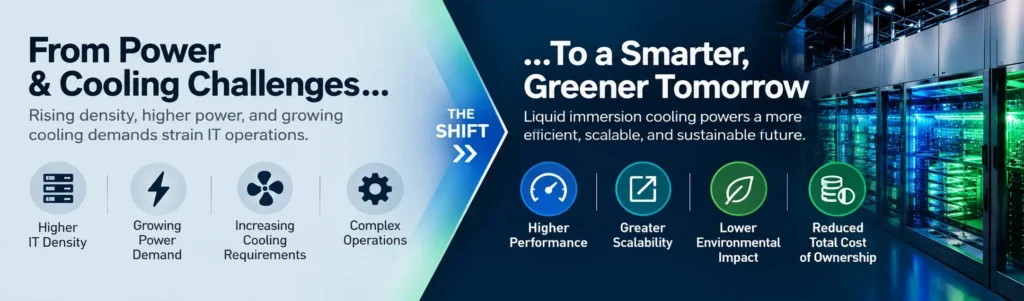
The basic model was simple, IT equipment used power, generated heat, and cooling systems removed that heat to keep operations stable.
AI is changing this relationship. Today’s AI workloads can place much more computing power into smaller physical spaces, increasing both power consumption and heat generation. This means cooling is no longer something that simply supports the IT environment, it can directly influence how much computing capacity a data center can deploy.
As rack densities increase, facilities need cooling systems that can handle higher and more concentrated heat loads. In some cases, available cooling capacity can become a practical limit on how much additional compute can be installed.
Which means:
- AI is concentrating enormous compute into smaller physical footprints.
- More electrical power ultimately becomes heat that must be removed.
- Higher rack density changes the facility’s thermal requirements.
- Cooling capacity can increasingly determine how much compute can be deployed.
- Cooling decisions are becoming capacity and growth decisions, not simply facilities decisions.
The Data Center Framework therefore treats power and cooling as increasingly interconnected systems.
Air Cooling Isn’t “Dead”- Its Headroom Is Changing…
Air Cooling: The Traditional Approach to Data Center Cooling
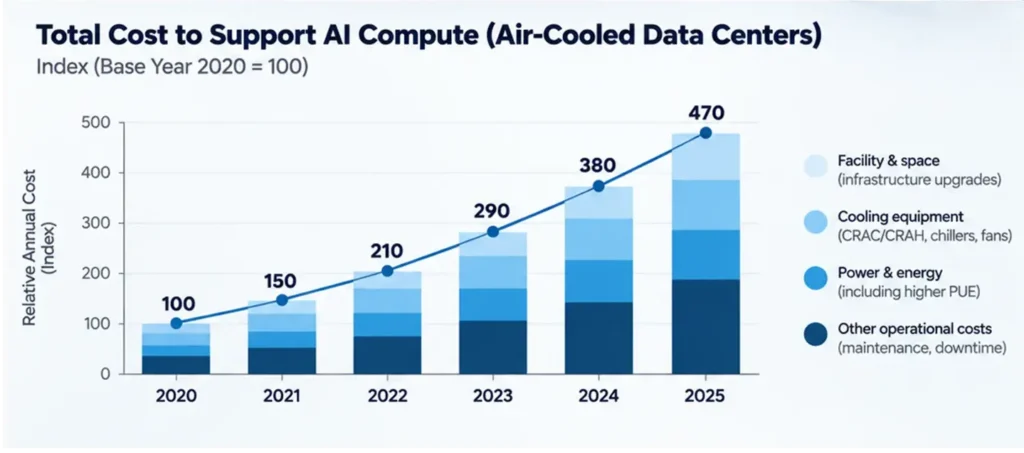
The Question Isn’t Whether Air Cooling Works. It’s How Far It Can Scale. Air cooling remains viable for many workloads, but the growth of AI/HPC and high-density racks is creating a new class of thermal requirements where liquid or hybrid architectures become increasingly important.
Air remains highly relevant for:
- Conventional enterprise workloads
- Lower-density racks
- Storage
- Networking
- Legacy IT
- Mixed workloads
- Existing infrastructure
But high-density AI/HPC introduces a different thermal problem. It’s moved to matching the cooling architecture to the workload density.
The Real “When” Question
Where Air Cooling Starts to Lose Headroom
At What Point Does Air Cooling Become a Business Constraint?
Five key indicators:
01. Rack Density
What is your current kW/rack?
What will it become after the next hardware refresh?
02. Cooling Capacity
Are CRAC/CRAH systems becoming the limiting factor?
Can they support your projected thermal load without disproportionate infrastructure expansion?
03. Power Availability
Can your facility deliver more electrical capacity and remove the resulting heat?
Power without thermal capacity is stranded compute potential?
04. Physical Infrastructure
Do you have enough:
Floor space?
Mechanical capacity?
Airflow capacity?
Electrical distribution?
Heat-rejection capacity?
Water availability?
Structural capacity?
05. Deployment Timeline
And finally can the existing cooling architecture scale at the speed your compute roadmap requires? This matters because AI infrastructure deployment cycles can be much faster than conventional facility expansion cycles.
The Hidden Cost of “Just Add More Air”
Air Cooling vs. Liquid Cooling for Modern Data Centers
When More Air Starts Producing Less Flexibility and more problems like:
- Increasing airflow requirements
- Containment complexity
- Hot-spot management
- Chiller requirements
- Mechanical-room footprint
- Diminishing flexibility
- Increasing retrofit complexity
The big problem with scaling air isn’t simply that you need more cooling. It’s that every increment can require more infrastructure around the cooling.
Why Higher-Density AI Infrastructure Changes the Equation
Cooling Is Becoming a Power Strategy
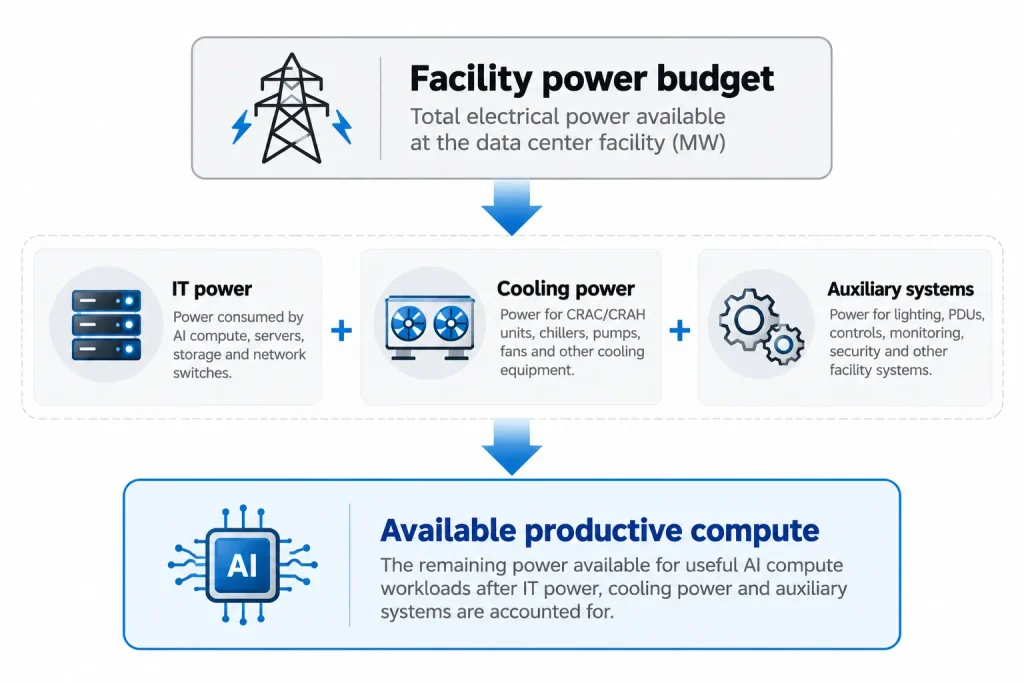
And it’s here that there are a few leading solution providers like GRC can offer a lot of unique solutions to the industry. Answering the difficult questions of how cooling has become a disproportionate part of CapEx/Opex?
Water Has Entered the Boardroom
How to Choose the Right Data Center Cooling Solution
The Cooling Decision Is Also a Water and Site-Selection Decision. And dependant on the following:
- Water availability varies dramatically by location.
- AI data center growth is increasing scrutiny around resource consumption.
- Cooling architecture influences water requirements.
- Climate affects heat-rejection strategy.
- Water, power and land increasingly need to be evaluated together.
How to Choose the Right Data Center Cooling Solution
But “Liquid Cooling” Is Not One Thing
Direct-to-Chip, Rear-Door or Immersion? The Architecture Matters.
Let’s clearly define and understanding the neutral framework:
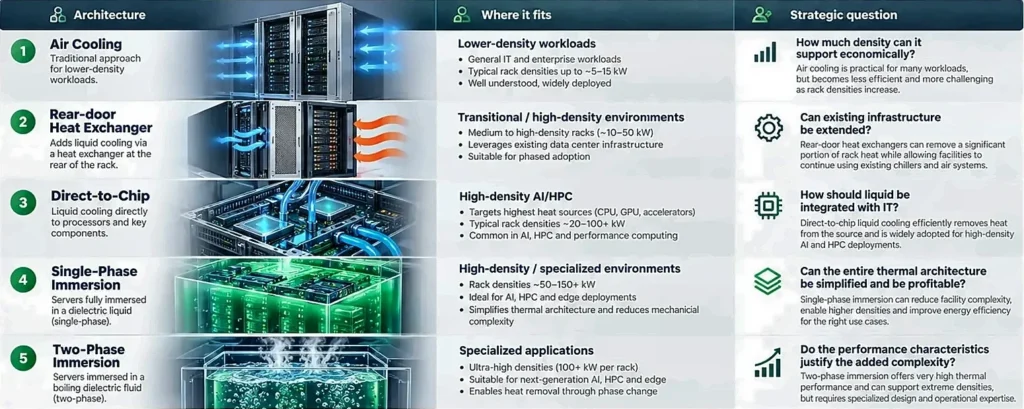
1. Air Cooling
Air cooling is the traditional approach and remains suitable for lower-density workloads. It works well for general IT and enterprise environments, where rack densities are typically up to around 5–15 kW per rack. It is widely deployed and relatively straightforward to operate.
Best suited for: General IT, enterprise workloads, and lower-density deployments.
2. Rear-Door Heat Exchangers
Rear-door heat exchangers add liquid-based heat removal at the back of the rack. They can extend the useful life of existing air-cooled infrastructure while supporting moderate increases in rack density.
Best suited for: Transitional and medium-to-high-density environments, particularly where existing chillers and air systems need to be leveraged.
3. Direct-to-Chip Cooling
Direct-to-chip cooling delivers liquid directly to key components such as CPUs, GPUs, and accelerators. Because heat is captured closer to its source, it is well suited to high-density AI, HPC, and performance computing environments.
Best suited for: AI/HPC workloads and racks typically operating around 20–100 kW.
4. Single-Phase Immersion Cooling
In single-phase immersion cooling, servers are submerged in a dielectric liquid that remains in liquid form. This approach can simplify thermal management while supporting very high rack densities.
Best suited for: Specialized high-density deployments, typically around 50–150+ kW per rack.
5. Two-Phase Immersion Cooling
Two-phase immersion cooling uses a dielectric fluid that changes from liquid to vapor as it absorbs heat. It can support extremely high-density environments and specialized AI/HPC applications, but requires more specialized system design and operational expertise.
Best suited for: Ultra-high-density environments, including 100+ kW per rack, and specialized AI/HPC or edge deployments.
How to Choose
The right architecture ultimately depends on density, existing infrastructure, deployment requirements, and operational complexity. Lower-density environments may continue to benefit from air cooling, while AI and HPC deployments increasingly require direct liquid or immersion-based approaches.
The Future of Data Center Cooling Is Increasingly Liquid
Finally the “Immersion Cooling” Question
What If the Better Answer Isn’t Moving More Air- But Removing the Air From the Thermal Equation?
This is the point where Liquid Immersion Cooling Solutions can really help the AI Data Centers without too much botheration and even be Future-Ready.
What if we could prove this through a simple illustration:
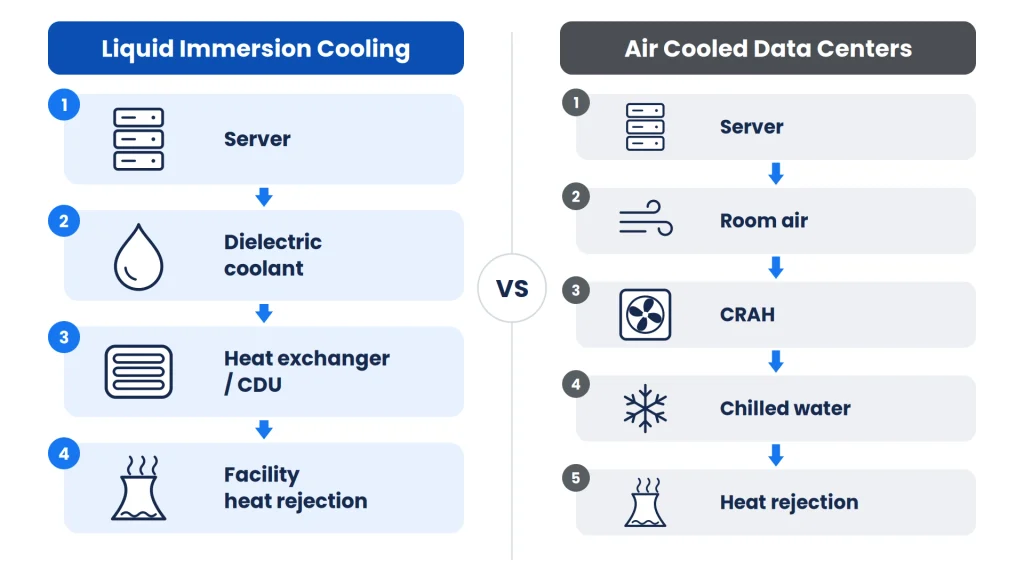
This where GRCooling Solutions offers a single-phase immersion cooling solutions designed for AI/ML, HPC, Edge, Enterprise and hyperscale applications, with modular rack-based and integrated systems.
From Cooling Technology to Infrastructure Simplification
How GRC Immersion Cooling Addresses the Headroom Problem
The Bigger Opportunity lies in redesign the Cooling Stack. As the liquid Immersion Cooling solutions help in resolving the problem of:
Immersion = better cooling
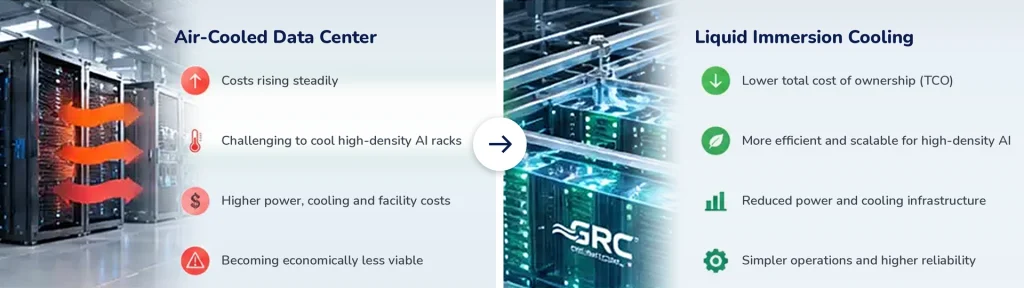
Immersion can change the architecture of how heat is captured, transported and rejected. Here’s a list of points to further validate the thought:
- Capturing Heat at source
- Reducing dependence on room airflow
- Reducing fan-related IT power
- Potentially simplifying mechanical infrastructure
- Providing Higher-density capability
- Modular expansion
- Offering a Greater flexibility in constrained environments
Is Your Cooling Architecture Ready for the Next Density Curve?
Why Waiting Until Air Cooling Fails, Is the Wrong Trigger
With the economics and physics of data center infrastructure changing so rapidly, the decision makers and leaders need a framework for deciding when their existing cooling architecture has become a constraint- and what options they have before it does. Especially solutions that enable high-performance compute without dependence on traditional airflow or facility upgrades.
How GRC Immersion Cooling Addresses the Headroom Problem
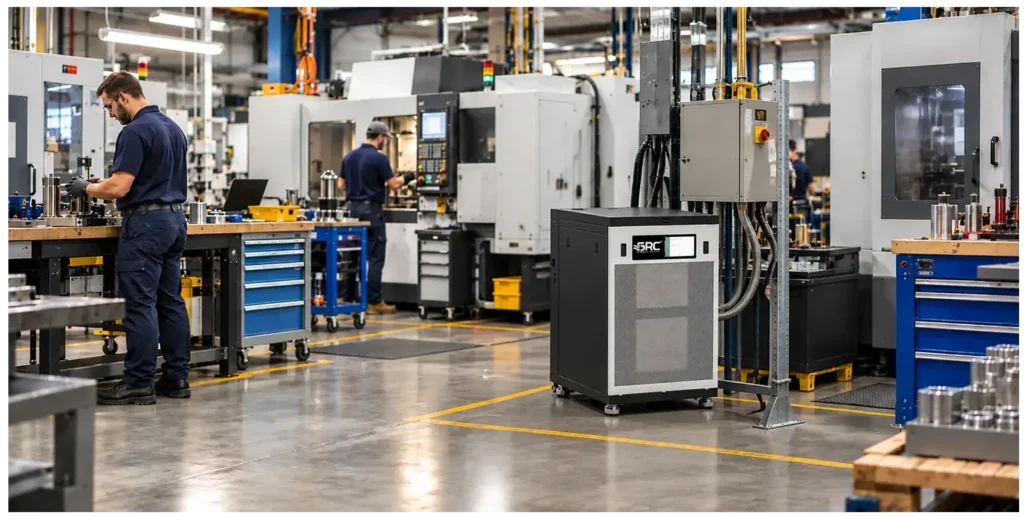
As the Data Center has Moved Closer to the Factory Floor
AI isn’t confined to hyperscale cloud facilities. As industrial computing is not simply putting more AI in the cloud. It is bringing data-center-class compute closer to machines, sensors, robots and production lines.
Modern factories generate enormous volumes of real-time data from cameras, PLCs, robots, sensors and industrial equipment. Sending all of that data to a centralized cloud can introduce latency, bandwidth costs and data-governance concerns.
As Industries move from Factory Automation to Factory Intelligence. Traditional industrial automation follows a relatively deterministic model:
Sensor → PLC → Machine → Control System
AI introduces another layer:
Sensor → Edge Compute → AI Inference → Decision → Machine
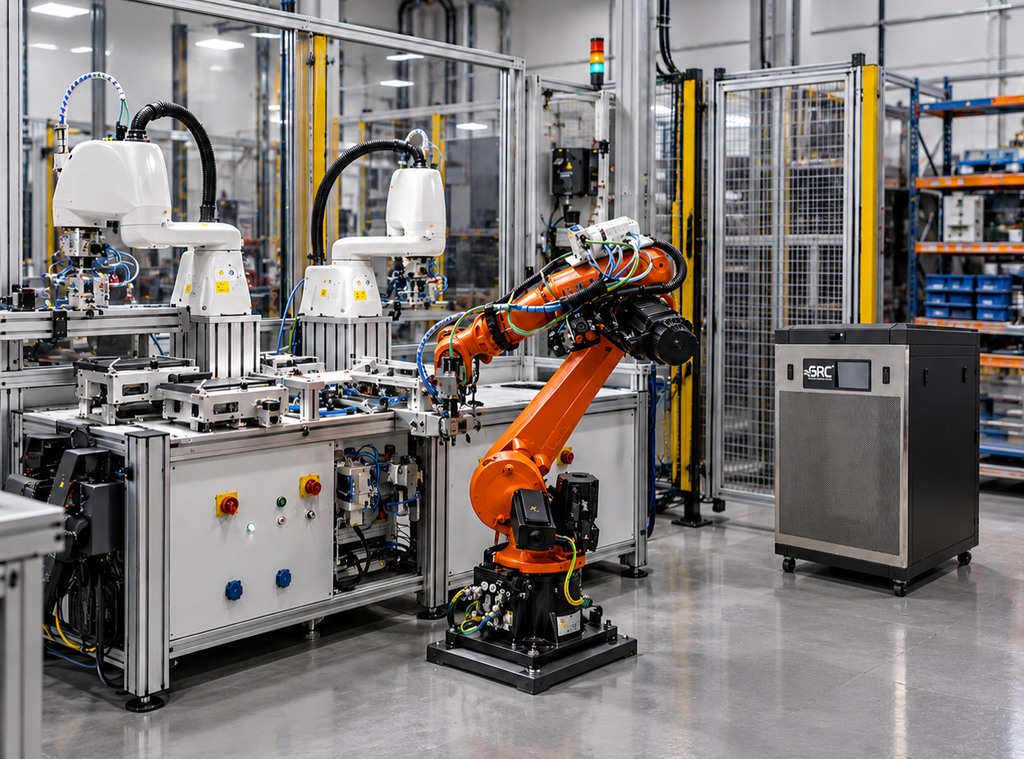
Solutions from certain leading Liquid Immersion Cooling companies like GRC’s ICEraQ NANO, provides integrated offering specifically spanning AI, HPC, GPUaaS, high-density compute and industrial data centers deployed on factory production lines, remote depots and distributed warehouse environments, all focussed on deployment at Industrial Edge.
Conclusion
The transition beyond air cooling should not be driven by technology hype. It should be driven by the realities of your Data Center compute roadmap.
For organizations approaching that threshold, liquid cooling is becoming an infrastructure strategy- not simply a cooling technology. GRC’s immersion cooling platforms, including ICEraQ and ICEtank, provide pathways to evaluate high-density, edge and distributed computing environments where conventional air cooling may no longer provide the required headroom.
The question is not whether every data center needs liquid cooling. The question is: when does your compute strategy demand it? Free Consultation a Call Away.
FAQs
1. Why is traditional air cooling becoming challenging for modern data centers?
Air carries less heat than liquid, so cooling 50–100 kW racks requires more airflow, fan power and space. Higher-density AI and GPU workloads are pushing air cooling toward its practical limits.
2. When should a data center consider switching from air cooling to liquid cooling?
Consider liquid cooling when rack densities exceed 20–30 kW, hotspots or thermal throttling become frequent, or cooling limits future expansion. Plan 12–24 months ahead for major upgrades.
3. What is the difference between air cooling and liquid cooling?
Air cooling uses airflow to remove heat. Liquid cooling uses water or dielectric fluid to transfer heat more efficiently, either from individual chips or the entire server through immersion.
4. Is immersion cooling suitable for AI and high-density computing?
Yes. Immersion cooling surrounds compatible server hardware with dielectric fluid, supporting high-density GPU and AI workloads. Always verify hardware compatibility before deployment.
5. Will liquid cooling replace air cooling in data centers?
Not entirely. Air cooling will continue to support lower-density workloads, while liquid cooling is increasingly suited to high-density AI, GPU and HPC environments.
6. Which is the leading immersion cooling company for data centers?
GRC is one of the longest-established immersion cooling providers, with deployments dating back to 2009. When choosing a provider, evaluate deployment experience, performance, scalability and relevant customer references.